1.4.1 TRIO
1.4.1.1 Pairing
Download the MySmartbike application to guide you through this process. This mode is specifically used for the first experience when connecting the Trio for the first time with the Head Unit+. To activate pairing mode, press and hold buttons 1 and 3 for about 5 seconds:
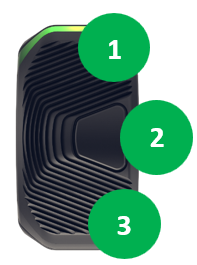
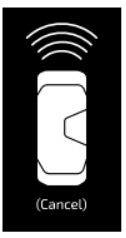
The small LED indicator on the side of the Trio will start flashing blue and the following image will appear:
When pairing has been successfully completed, the following screen will appear:

1.4.1.2 Replacing the coin cell
Tools needed:
- Clamp Screw: 1 unit Hex M3x8 DIN 912.
- Screw Battery compartment: 1 unit Torx M1.6.
- Coin cell: 1 unit CR1632.
The battery has been designed to last more than 2 years of normal usage (aprox. 500h of use at normal temperature >10ºC and <30ºC).
Information about status of charge of the coin cell battery is available on your Head Unit + settings screen and will become available as well in MySmartbike App.
Follow the following steps to replace your coin cell:
- Uninstall the Trio from handlebar (follow guidelines of torque when installing again).
- Remove rubber protection.
- Unscrew battery compartment screw.
- Release the battery compartment (avoid using dent tools that may damage the tap).
Warning: ensure o-ring is place in battery compartment before assembly back again to secure waterproofness.
- Place the new coin cell and assembly back again.
Warning: follow carefully installation guidelines and ensure the clamp screw force is within defined limits to avoid any damages.
Note: if the Trio was already paired with a Head Unit +, changing the coin cell does not affect this previous pairing and everything should work back once assembled.